CO 3713 DIGITAL COMMUNICATION
ASSOCIATE PROFESSOR WENDY ROUSSIN, MFA
wroussin@comm.msstate.edu
 EXERCISE 1 – WELCOME PAGE
DUE: CHECK CANVAS FOR DUE DATE. SERVER UPLOAD
You will need to create a home page for your classwork this semester. This page will be the first page a visitor will see when viewing your site.
This home page will be created using Dreamweaver CC and should be saved with the name ‘index.html’ into a folder called ‘web_local’ on your personal laptop or flashdrive. To turn it in – the file(s) will be placed onto the class server (separate handout).
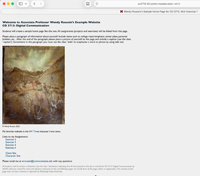
MY EXAMPLE PAGE: http://co3713-02.comm.msstate.edu/~wkr1/
Required Elements
<head> section
Title: (Your) Name’s Sample Home Page for CO 3713. AKA-Exercise 1
CSS – set in Page Properties:
- Appearance (CSS): page font (first box only), size, text color, background color and left and top margins (use at least 20 pixels for margins)
- Links (CSS): "a:link, :visited, :hover, & :active" for link colors and decoration
- Headings (CSS):"h1" tag that is bold (default) and 2 px larger than your normal font size
- a class for italic text (name it: .italic) to create italic text at the same size as your normal font
- a class for the disclaimer (name it: .disclaimer) to create a smaller, italic font size that is lighter in color than your normal text (or darker than your page background).
- a class for a caption (name it: .caption) to create a caption for your photograph that is smaller than your normal text. It can also be a lighter font weight and/or italic if you desire
- OPTIONAL. A class for indented links (name it: .indentForLink) with a ‘margin-left’ of at least 10 pixels.
<body> section
- An 850 pixel wide table (border=0, cellspacing=0, cellpadding=0) to contain your content
- An h1 header to welcome people to your page.
- A paragraph or two about yourself (follow my example page)
- Use the class ‘.italic’ somewhere
- A .jpg format picture of yourself titled ’myPicture.jpg’
- An "alt tag" for you photo, use the same information as in the caption.
- A caption for your photo, use the class ‘.caption’ for this.
- A link to your ‘favorite’ website that opens into a new window or tag along with a quick explanation as why it’s your favorite
- Links to other assignments (follow my example page)
- A link to your MSU email address with a subject line of ‘Home Page’
- The following disclaimer (use class ‘.disclaimer’):
All work posted on this site is created for CO 3713: Digital Communication by NAME (Add your name). The views and opinions expressed on this and following pages are strictly those of the page author or organization. The contents of this page have not been reviewed or approved by Mississippi State University.
DISCUSSION BOARD:
POST: One thing you need help with for this assignment
POST: One thing you think would be helpful for your classmates while they are working on the assignment
RESPOND: Respond to at least two of your classmates comments. Responses should be at a bare minimum of one complete sentence. No one word answers.
Please do your best to ensure that all students receive a response to their posts.