CO 3713 DIGITAL COMMUNICATION
ASSOCIATE PROFESSOR WENDY ROUSSIN, MFA
wroussin@comm.msstate.edu
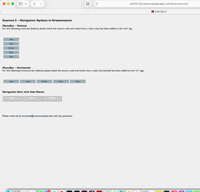 EXERCISE 5 – NAVIGATION AND ADVANCED CSS STYLING
DUE: CHECK CANVAS FOR DUE DATE. SERVER UPLOAD
- CSS Styled Navigation Bars (Horizontal and Vertical)
- CSS Styled Navigation Bars with Drop Down Menus
This page will be created using Dreamweaver CC and should be saved with the name ‘exercise5.html’ into your ‘web_local’ folder on your personal laptop or flashdrive. To turn it in – the file will be placed onto the class server (separate handout).
Required elements:
< head> section
Title: Exercise 5
Meta Tags for keywords and descriptions (insert→html→keywords; insert→html→description) to add keywords and a brief description to your page. Make sure you insert these into the <head> section below the existing meta tag.
CSS:
- CSS: Appearance (CSS): page font (first box only), size, text color, background color and left and top margins (use at least 20 pixels for margins)
- Links (CSS): "a:link, :visited, :hover, & :active" for link colors and decoration
- Headings (CSS): "h1" tag that is bold (default) and 2 px larger than your normal font size
- Headings (CSS): "h2" tag that is bold (default) and the same size as your normal text
The CSS for the menu bars (/* BEGIN MENU BAR CSS */ through /* END MENU BAR CSS*/ ) – COPY from my page and adjust for your page. You can leave the comments.
- Colors (fonts, boxes, rollovers) must be different than mine
- Width & height of the boxes must be different than mine
- Look for /* CHANGE THIS*/ in the style section
The CSS for the drop-down menu bars bars (/* BEGIN DROP_DOWN NAVIGATION*/ through /* END DROP_DOWN NAVIGATION*/) – COPY from my page and adjust for your page. You can leave the comments.
- Colors (fonts, boxes, rollovers) must be different than mine
- Width & height of the boxes must be different than mine
- Look for /* CHANGE THIS*/ in the style section
<body> section
- An h1 header: Exercise 5 – Navigation Options in Dreamweaver
- h2 headers: Identify each Menu Bar option
- The 3 menu bars with the required CSS adjustments
- Add links to exercises 1-4 in the Vertical and Horizontal Bars
- Set the link on the 'five' box to # in the Vertical and Horizontal Bars
- All links should be set to # in the Drop Down Menu
- Remember to complete all formatting in the Drop Down Menu Bar before applying the class (ul.navSubmenu) to the ul tag
- A link to your MSU email address with a subject line of ‘Exercise 5'
DISCUSSION BOARD:
POST: One thing you need help with for this assignment
POST: One thing you think would be helpful for your classmates while they are working on the assignment
RESPOND: Respond to at least two of your classmates comments. Responses should be at a bare minimum of one complete sentence. No one word answers.
Please do your best to ensure that all students receive a response to their posts.