CO 3713 DIGITAL COMMUNICATION
ASSOCIATE PROFESSOR WENDY ROUSSIN, MFA
wroussin@comm.msstate.edu
 EXERCISE 4 – FORMS
DUE: CHECK CANVAS FOR DUE DATE. SERVER UPLOAD
In this exercise, we will learn how to create a form with Dreamweaver. Viewers will be able to submit this form via email.
This page will be created using Dreamweaver CC and should be saved with the name ‘exercise4.html’ into your ‘web_local’ folder on your personal laptop or flashdrive. To turn it in – the file(s) will be placed onto the class server (separate handout).
Required elements:
< head> section
Title: Exercise 4
Meta Tags for keywords and descriptions (insert→html→keywords; insert→html→description) to add keywords and a brief description to your page. Make sure you insert these into the <head> section below the existing meta tag.
CSS:
- Appearance (CSS): page font (first box only), size, text color, background color and left and top margins (use at least 20 pixels for margins)
- Links (CSS): "a:link, :visited, :hover, & :active" for link colors and decoration
- Headings (CSS): "h1" tag that is bold (default) and 2 px larger than your normal font size
- Headings (CSS): "h2" tag that is bold (default) and the same size as your normal text
<body> section
- An h1 header: Exercise 4: Creating a Survey
- An h2 header: Please Complete the Following Survey:
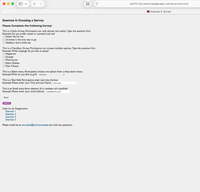
- All required form elements found on my example page (see below for more info).
Don't forget to update the NAMEs on the form element.
You can use my sample questions or write your own questions.
If you write your own questions – you must have:
1 Radio Group, min 3 answers
1 Checkbox Group, min 5 answers
1 Select menu, min 6 answers plus the Choose One:
1 Textfield, with pre-populated value
1 Textfield variant (like an email field), with pre-populated value
- Links to other assignments (follow my example page)
- Subject line for email – placed in the Form Action box. "Exercise 4"
Setting up a Form:
- Add a Form (InsertFormForm)
- action=mailto:netID@msstate.edu?subject= Exercise 4
- method=post
- enctype=text/plain
- Use InsertFormDesired Element to begin adding the form elements to your form
- All of the interactive elements need to be in a single form. Make sure you are still inside of the red rectangle (indicates form boundaries) when adding new elements.
- Groups (Radio, Checkbox) should have the 'question' typed prior to adding the form element. You CANNOT add options or re-arrange the list order once these types of form elements are chosen. If mistakes are made or you want to add more options, delete the form element in its entirety and start over.
- For other form elements - you will insert the form element and then customize in the 'Design' view and the properties box.
- Forms have several required elements. You must have an "NAME" and/or "ID" and a "VALUE" to identify the form object and selection when the form is returned to you. Many form elements also have a "LABEL".
When you add a form element (text, email, select, radio or checkbox group, etc…) it is very important that you add a unique and descriptive name. You will either add this NAME in the dialog box provided by the form element when you enter it or with the properties palette at the bottom of the Dreamweaver window (add your descriptive NAME / ID and VALUE in place of the pre-populated information provided). No spaces or special characters are allowed in the NAME and the NAME should start with a lowercase letter.
For Select, Checkbox Group and Radio Group form elements: the LABEL is the text that appears on the form and the VALUE is what will be returned to the form owner when the form is submitted. Often the value is a shortened version of the label.
For text and text style form elements the VALUE will be typed in by the form participant. You may choose to pre-populate the value with helpful or descriptive text if you'd like. For this exercise, follow the examples on my form.
DISCUSSION BOARD:
POST: One thing you need help with for this assignment
POST: One thing you think would be helpful for your classmates while they are working on the assignment
RESPOND: Respond to at least two of your classmates comments. Responses should be at a bare minimum of one complete sentence. No one word answers.
Please do your best to ensure that all students receive a response to their posts.