CO 3713 DIGITAL COMMUNICATION
ASSOCIATE PROFESSOR WENDY ROUSSIN, MFA
wroussin@comm.msstate.edu
 EXERCISE 2 –FLOATING IMAGES WITH TEXT
DUE: CHECK CANVAS FOR DUE DATE. SERVER UPLOAD
For this exercise we will work with (fake) images that will float alongside text.
This page will be created using Dreamweaver CC and should be saved with the name ‘exercise2.html’ into your ‘web_local’ folder on your personal laptop or flashdrive. To turn it in – the file(s) will be placed nto the class server (separate handout).
Required Elements
<head> section
Title: Exercise 2
CSS:
- Appearance (CSS): page font (first box only), size, text color, background color and left and top margins (use at least 20 pixels for margins)
- Links (CSS):"a:link, :visited, :hover, & :active" for link colors and decoration
- Headings (CSS):"h1" tag that is bold (default) and 2 px larger than your normal font size
- Headings (CSS):"h2" tag that is bold (default) and the same size as your normal text
- a class for a left floating image (.imgFloatLeft) with a float left, a padding of 5px, a right margin of 10px and a 1px solid border that is the same color as your page font
- a class for a right floating image (.imgFloatRight) with a float right, a padding of 5px, a left margin of 10px and a 1px solid border that is the same color as your page font
- if you created a class .indentForLink for exercise 1, you can use it here too
<body> section
- An 850 pixel wide table (border=0, cellspacing=0, cellpadding=0) to contain your content. This table should have 4 rows and 1 column. All rows should have a horizontal left alignment and a vertical top alignment.
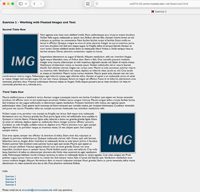
- ROW 1: An h1 header: Exercise 2 - Working with Floated Images and Text
- ROW 2: An h2 header: Second Table Row
- ROW 2: 2-3 paragraphs of dummy text (generate it at: http://www.lipsum.com, uncheck the box “Start with ‘Lorem ipsum….’) and an image placed before the first paragraph and floated to the left (attach the class of .imgFloatLeft to the image). You can drag my sample image from my page to your 'web_local' folder. Add an alt tag for the image: image floated to the left.
- ROW 3: An h2 header: Third Table Row
- ROW 3: 3-5 paragraphs of dummy text and an image placed before the second paragraph and floated to the right (attach the class of .imgFloatRight to the image). You should reuse the same image. Add an alt tag for the image: image floated to the right.
- ROW 4: Links to other assignments (follow my example page)
Make sure your link to Exercise 2 works from your index page (exercise 1) - ROW 4: A link to your MSU email address with a subject line of ‘Exercise 2'
NOTE: Some of the generated paragraphs will be longer than others, it is perfectly acceptable to delete extraneous text as long as least 2 lines of text fall below the floated images.
DISCUSSION BOARD:
POST: One thing you need help with for this assignment
POST: One thing you think would be helpful for your classmates while they are working on the assignment
RESPOND: Respond to at least two of your classmates comments. Responses should be at a bare minimum of one complete sentence. No one word answers.
Please do your best to ensure that all students receive a response to their posts.